Flow Agentic Accounting

LiveFlow FP&A

Industries

Resources

Flow Agentic Accounting

LiveFlow FP&A

Industries

Resources

Google Sheets Tips

none

How to Wrap Text in Cell in Google Sheets

SHARE THIS Article

‍

In this article, you will learn how to wrap a text in a cell in Google Sheets.

‍

Learning this method is beneficial when you want to organize a data series or make your table and list look beautiful and straightforward in Google Sheets.

‍

Also, we discuss two other types of text formatting allowed in Google sheets.

‍

‍

How to apply the “wrapping text” rule to cells

‍

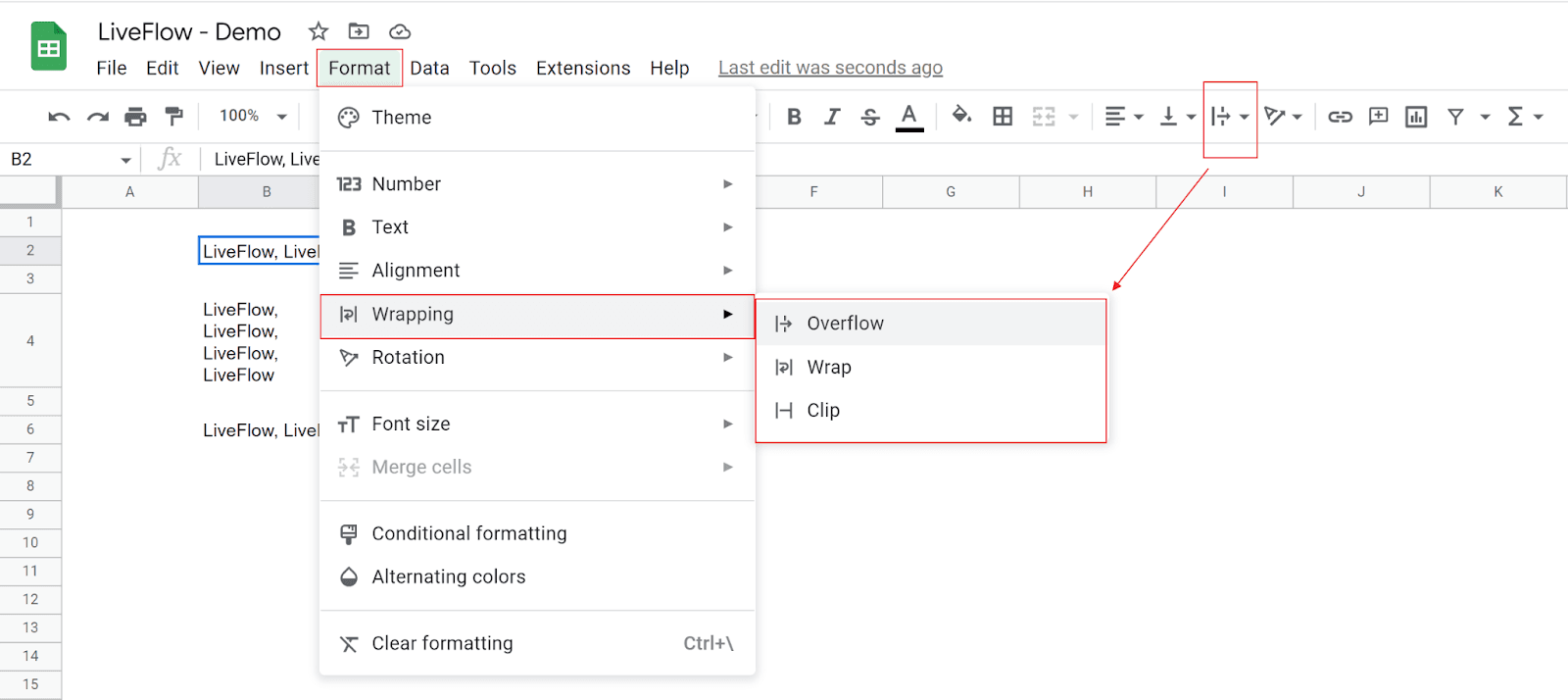
  1. Click the “Text wrapping” icon in the toolbar or navigate to the “Format” tab → “ Wrapping”. 
    ‍

  2. Choose “Wrap” in the small pop-up or drop-down menu.
    ‍

Wrap a text in a cell

‍

   Your next financial spreadsheet could be right here!

   100+ spreadsheet templates, from FP&A to tax planning.

   Free Spreadsheet Templates

‍

With this rule applied, a value in a cell is wrapped so that all value is fully shown. If it doesn’t look so, you may need to adjust a row height or a column width. 

‍

‍

What are the other two types of formatting?

‍

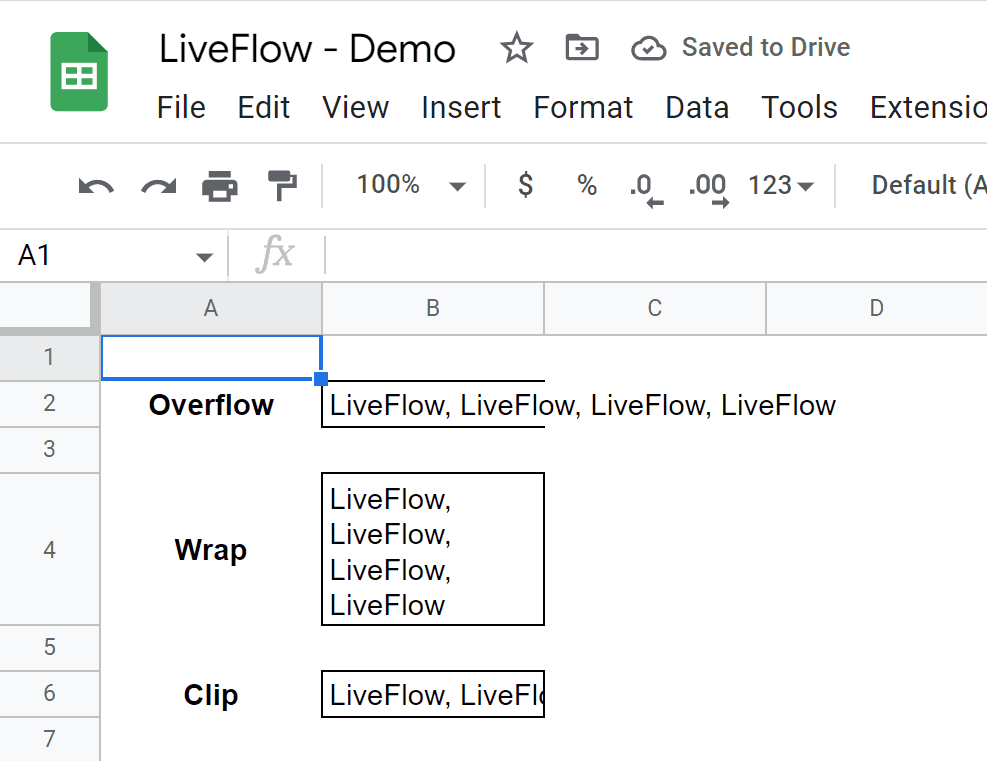
There are two more kinds of formatting, “Overflow” (default setting) and “Clip”. You can select them from the pop-menu we described in the section above.

‍

The “Overflow” allows a cell value to spill over to the surface of the next cell, whereas the “Clip” does not. With the “Clip” option, the value doesn’t go beyond the right edge of a cell. The following picture compares what the three types of formatting in a practical situation look like.
‍

What “Overflow“, “Wrap”, and “Clip” look like

‍

   Turn Quickbooks Online data into a Google Sheets dashboard

    100+ templates, update automatically, totally secure!

   Book a Demo

Supercharge your financial reporting

LiveFlow is an agent of Plaid Financial Ltd. (Company Number: 11103959, Firm Reference Number: 804718), an authorized payment institution regulated by the Financial Conduct Authority under the Payment Services Regulations 2017. Plaid provides you with regulated account information services through LiveFlow as its agent.

© LiveFlow. All rights reserved.

LiveFlow is an agent of Plaid Financial Ltd. (Company Number: 11103959, Firm Reference Number: 804718), an authorized payment institution regulated by the Financial Conduct Authority under the Payment Services Regulations 2017. Plaid provides you with regulated account information services through LiveFlow as its agent.

© LiveFlow. All rights reserved.

LiveFlow is an agent of Plaid Financial Ltd. (Company Number: 11103959, Firm Reference Number: 804718), an authorized payment institution regulated by the Financial Conduct Authority under the Payment Services Regulations 2017. Plaid provides you with regulated account information services through LiveFlow as its agent.

© LiveFlow. All rights reserved.

LiveFlow is an agent of Plaid Financial Ltd. (Company Number: 11103959, Firm Reference Number: 804718), an authorized payment institution regulated by the Financial Conduct Authority under the Payment Services Regulations 2017. Plaid provides you with regulated account information services through LiveFlow as its agent.

© LiveFlow. All rights reserved.