Flow Agentic Accounting

LiveFlow FP&A

Industries

Resources

Flow Agentic Accounting

LiveFlow FP&A

Industries

Resources

Google Sheets Formulas

others

RANDBETWEEN Function in Google Sheets: Explained

SHARE THIS Article

‍

In this article, you will learn how to use the RANDBETWEEN formula in Google Sheets.

‍

‍

What is the RANDBETWEEN formula in Google Sheets?

‍

The RANDBETWEEN function in Google Sheets generates a random number between two specified numbers, inclusive.

‍

Note that the RANDBETWEEN function generates a new random number every time the sheet is recalculated. To generate a new random number, you can simply recalculate the sheet by changing any cell in the sheet.

‍

   Save hours formatting your next financial spreadsheet!

   100+ templates, all free to use.

   Free Spreadsheet Templates

‍

‍

How do I use the RANDBETWEEN function in Google Sheets?

‍

The RANDBETWEEN has the following syntax:

=RANDBETWEEN(low, high)

‍

Where "low" is the lower bound of the range and "high" is the upper bound of the range. The function will return a random integer that is greater than or equal to the bottom value and less than or equal to the top value.

‍

Note that input values with decimal parts may be used for low and/or high. However, this will cause the least and greatest possible values to be the next integer greater than low and/or the next integer less than high, respectively.

‍

So, it is recommended that you input integers in the parameter to avoid any confusion.

‍

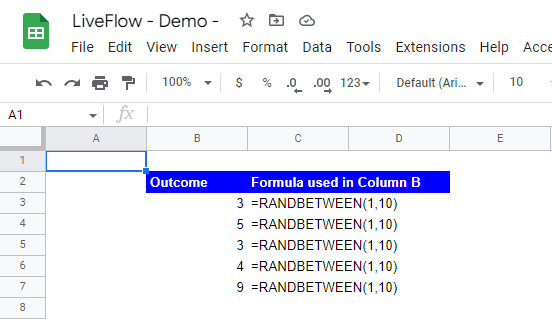
For example, if you want to generate a random number between 1 and 10, you would use the following formula:

=RANDBETWEEN(1, 10)
=RANDBETWEEN(1, 10)
=RANDBETWEEN(1, 10)
=RANDBETWEEN(1, 10)

‍

This function is useful for generating random numbers for a variety of purposes, such as testing data sets, creating random samples, or simulating random events.
‍

use the RANDBETWEEN formula with examples

‍

   Learn how LiveFlow can save you hours a month on financial reporting!

   Just 30 minutes can change the way your business operates forever.

   Book a Demo

Supercharge your financial reporting

LiveFlow is an agent of Plaid Financial Ltd. (Company Number: 11103959, Firm Reference Number: 804718), an authorized payment institution regulated by the Financial Conduct Authority under the Payment Services Regulations 2017. Plaid provides you with regulated account information services through LiveFlow as its agent.

© LiveFlow. All rights reserved.

LiveFlow is an agent of Plaid Financial Ltd. (Company Number: 11103959, Firm Reference Number: 804718), an authorized payment institution regulated by the Financial Conduct Authority under the Payment Services Regulations 2017. Plaid provides you with regulated account information services through LiveFlow as its agent.

© LiveFlow. All rights reserved.

LiveFlow is an agent of Plaid Financial Ltd. (Company Number: 11103959, Firm Reference Number: 804718), an authorized payment institution regulated by the Financial Conduct Authority under the Payment Services Regulations 2017. Plaid provides you with regulated account information services through LiveFlow as its agent.

© LiveFlow. All rights reserved.

LiveFlow is an agent of Plaid Financial Ltd. (Company Number: 11103959, Firm Reference Number: 804718), an authorized payment institution regulated by the Financial Conduct Authority under the Payment Services Regulations 2017. Plaid provides you with regulated account information services through LiveFlow as its agent.

© LiveFlow. All rights reserved.