Flow Agentic Accounting

LiveFlow FP&A

Industries

Resources

Flow Agentic Accounting

LiveFlow FP&A

Industries

Resources

Google Sheets Formulas

operators

MINUS Function in Google Sheets: Explained

SHARE THIS Article

‍

In this article, you will learn how to use the MINUS formula in Google Sheets.

‍

‍

What is the MINUS function in Google Sheets?

‍

The MINUS function in Google Sheets subtracts one value from another.

‍

Note that the MINUS formula takes only two values as input and that the MINUS function doesn’t take an array or range as arguments but only a single value or a cell.

‍

   Your next financial spreadsheet could be right here!

   100+ spreadsheet templates, from FP&A to tax planning.

   Free Spreadsheet Templates

‍

‍

How to use the MINUS formula in Google Sheets

‍

Here's the syntax for the function:

=MINUS(value1, value2)

‍

value1: The value or cell reference to subtract from.

‍

value2: The value or cell reference to subtract.

‍

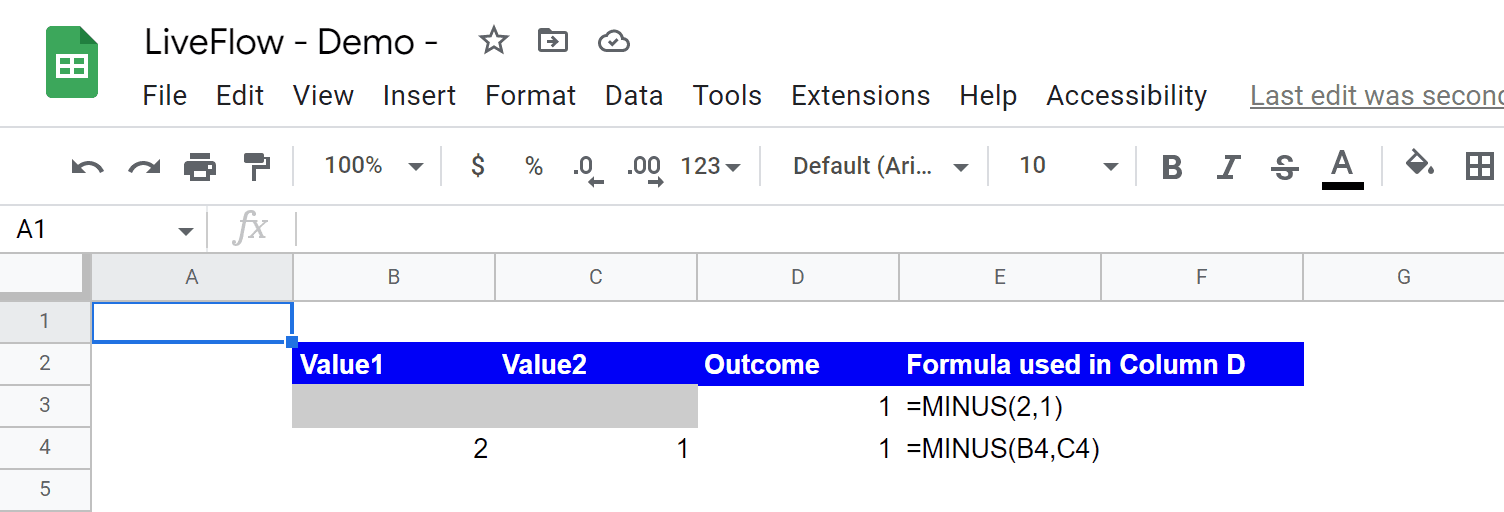
For example, if you want to deduct 1 from 2, you can use the following formula:

=MINUS(2,1)
=MINUS(2,1)
=MINUS(2,1)
=MINUS(2,1)

‍

Another example is that, if you wanted to subtract the value in cell A1 from the value in cell A2, you could use the following formula:

=MINUS(B4, C4)
=MINUS(B4, C4)
=MINUS(B4, C4)
=MINUS(B4, C4)

‍

This would return the result of the subtraction.
‍

How to use the MINUS formula 

‍

   Turn Quickbooks Online data into a Google Sheets dashboard

    100+ templates, update automatically, totally secure!

   Book a Demo

‍

‍

What is the alternative to the MINUS function in Google Sheets?

‍

You can use a minus sign “-” as an operator for subtraction in Google Sheets. For instance, if you want to subtract 1 from 2, you can insert the following formula in a cell:

=2-1
=2-1
=2-1
=2-1

‍

A cell reference can be used in addition. For example, if you want to subtract 1 in cell B1 from 2 in cell C1, the formula would be as follows:

=C1-B1
=C1-B1
=C1-B1
=C1-B1

Supercharge your financial reporting

LiveFlow is an agent of Plaid Financial Ltd. (Company Number: 11103959, Firm Reference Number: 804718), an authorized payment institution regulated by the Financial Conduct Authority under the Payment Services Regulations 2017. Plaid provides you with regulated account information services through LiveFlow as its agent.

© LiveFlow. All rights reserved.

LiveFlow is an agent of Plaid Financial Ltd. (Company Number: 11103959, Firm Reference Number: 804718), an authorized payment institution regulated by the Financial Conduct Authority under the Payment Services Regulations 2017. Plaid provides you with regulated account information services through LiveFlow as its agent.

© LiveFlow. All rights reserved.

LiveFlow is an agent of Plaid Financial Ltd. (Company Number: 11103959, Firm Reference Number: 804718), an authorized payment institution regulated by the Financial Conduct Authority under the Payment Services Regulations 2017. Plaid provides you with regulated account information services through LiveFlow as its agent.

© LiveFlow. All rights reserved.

LiveFlow is an agent of Plaid Financial Ltd. (Company Number: 11103959, Firm Reference Number: 804718), an authorized payment institution regulated by the Financial Conduct Authority under the Payment Services Regulations 2017. Plaid provides you with regulated account information services through LiveFlow as its agent.

© LiveFlow. All rights reserved.