Google Sheets Tips
menu-and-toolbar
How to Show Formulas in Google Sheets
SHARE THIS Article
In this post, you will learn how to show and hide formulas in Google Sheets.
This function is useful when you want to see where each number in cells comes from - manual input, cell references in the same sheet or from other sheets, or external databases - or find something strange or wrong to be modified by allowing you to look at formulas used on the sheet at a glance.
What is showing formulas in Google Sheets?
In Google Sheets, "Showing Formulas" refers to a feature that allows you to display the actual formulas used in cells, rather than the calculated results.
By enabling the "Show Formulas" option, you can view the formulas that are entered in cells and see how they are being used to calculate the values displayed in those cells.
Why is it important to show formulas in Google Sheets?
Showing formulas in Google Sheets is important for:
Formula Verification: Verify the accuracy of formulas by checking for correct writing, cell references, and desired calculations, helping to identify and fix formula errors or discrepancies
Troubleshooting: Aid in identifying and resolving formula-related issues, such as incorrect references, operators, or functions, for more efficient problem-solving
Understanding Complex Spreadsheets: Provide visibility into complex formulas, facilitating comprehension of relationships between cells or ranges and their contribution to final results
Learning and Teaching: Act as an educational tool for learners, teachers, or collaborators to understand and master spreadsheet functions and calculations by seeing actual formulas in cells
Why spend hours creating spreadsheets, when we have already done the work for you?
100+ financial spreadsheet templates, all free and ready for you now.
Free Spreadsheet Templates
How to show formula in Google Sheets
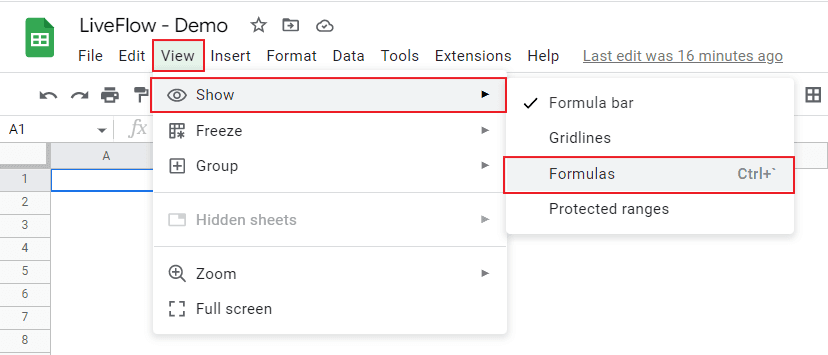
With a shortcut key
Press “Ctrl” and “`” simultaneously for Windows and Mac
Done
Without a shortcut key
Go to “Show” tab, select “View”, and check “Formulas”
Done
How to delete formula in Google Sheets
You can switch off the function by following the same steps as you turn it on.
With a shortcut key
Press “Ctrl” and “`” simultaneously for Windows and Mac
Done
Without a shortcut key
Go to “Show” tab, select “View”, and uncheck “Formulas”
Done
Learn how LiveFlow can save you hours a month on financial reporting!
Just 30 minutes can change the way your business operates forever.
Book a Demo
Supercharge your financial reporting