Google Sheets Tips

menu-and-toolbar

How to Enable Excel Shortcuts in Google Sheets

SHARE THIS Article

You will learn how to use Excel Shortcuts in Google Sheets.

How to turn on compatible spreadsheet shortcuts in Google Sheets.

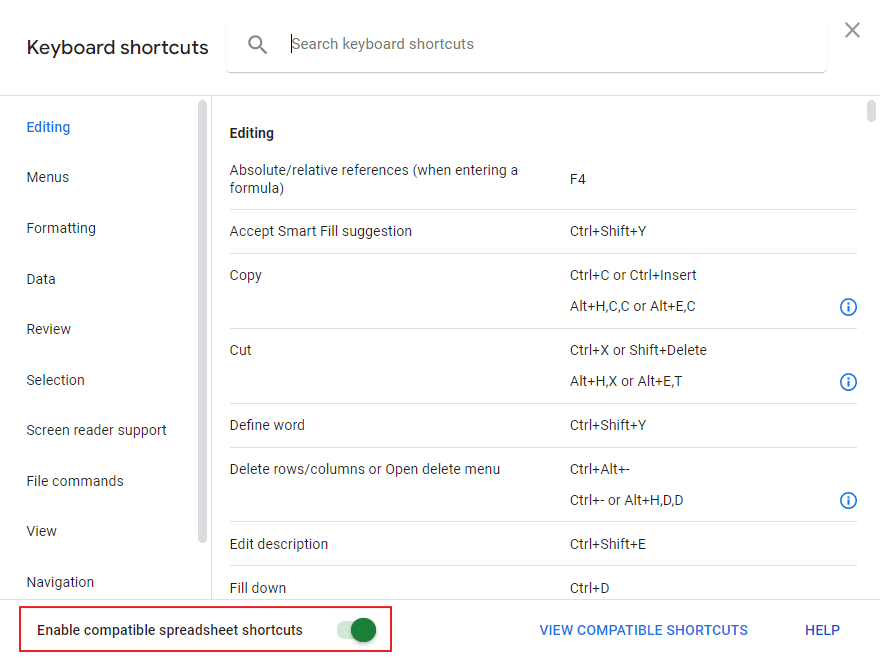
  1. Press “Ctrl” and “/” or go to “Help” and then “Keyboard shortcuts”

  2. At the bottom of the pop-up window, toggle “Enable compatible spreadsheet shortcuts” on
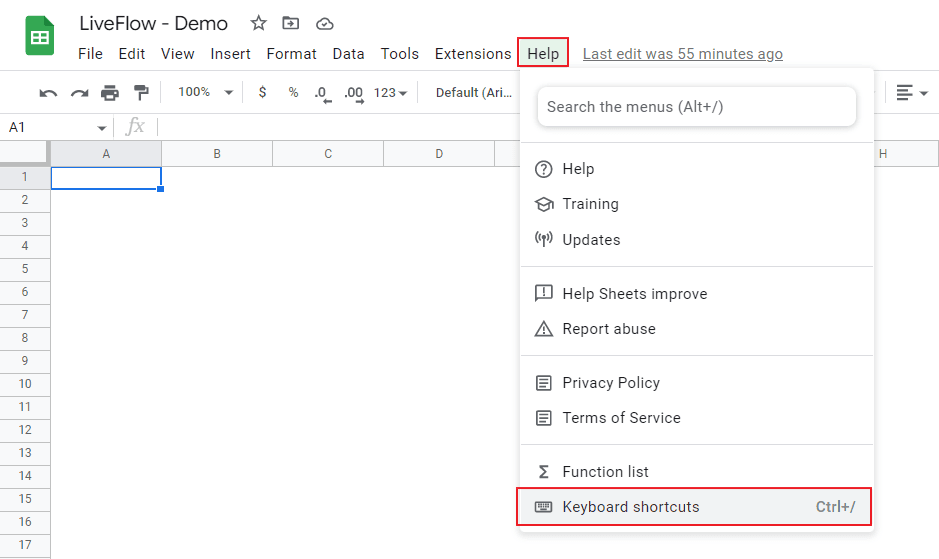
enable compatible spreadsheet shortcuts

Turn on Excel shortcuts

Do Google Sheets have the same shortcuts as Excel?

You can use most parts of Excel shortcuts in Google Sheets if you turn on the “Enable compatible spreadsheet shortcuts” function. Note that some shortcuts might not work for all keyboards and language settings.

LiveFlow is an agent of Plaid Financial Ltd. (Company Number: 11103959, Firm Reference Number: 804718), an authorised payment institution regulated by the Financial Conduct Authority under the Payment Services Regulations 2017. Plaid provides you with regulated account information services through LiveFlow as its agent.

© LiveFlow. All rights reserved.

LiveFlow is an agent of Plaid Financial Ltd. (Company Number: 11103959, Firm Reference Number: 804718), an authorised payment institution regulated by the Financial Conduct Authority under the Payment Services Regulations 2017. Plaid provides you with regulated account information services through LiveFlow as its agent.

© LiveFlow. All rights reserved.

LiveFlow is an agent of Plaid Financial Ltd. (Company Number: 11103959, Firm Reference Number: 804718), an authorised payment institution regulated by the Financial Conduct Authority under the Payment Services Regulations 2017. Plaid provides you with regulated account information services through LiveFlow as its agent.

© LiveFlow. All rights reserved.

LiveFlow is an agent of Plaid Financial Ltd. (Company Number: 11103959, Firm Reference Number: 804718), an authorised payment institution regulated by the Financial Conduct Authority under the Payment Services Regulations 2017. Plaid provides you with regulated account information services through LiveFlow as its agent.

© LiveFlow. All rights reserved.