Refresh
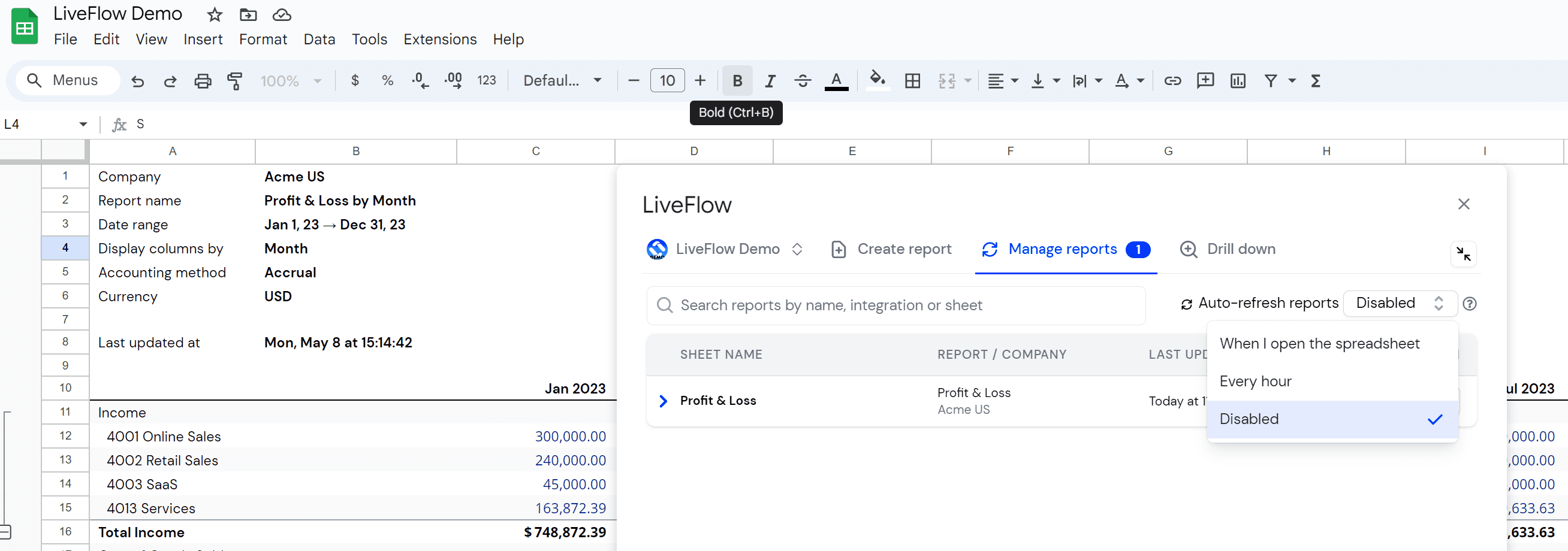
How to disable auto-refresh
SHARE THIS Article
How to disable auto-refresh
Open “LiveFlow for QuickBooks” under Google Sheets Extensions
Click on your Workspace Icon
Go to Manage Reports
Select the Disabled from the Auto-refresh reports drop-down menu
Done!
Supercharge your financial reporting
Recent
LiveFlow is an agent of Plaid Financial Ltd. (Company Number: 11103959, Firm Reference Number: 804718), an authorized payment institution regulated by the Financial Conduct Authority under the Payment Services Regulations 2017. Plaid provides you with regulated account information services through LiveFlow as its agent.
© LiveFlow. All rights reserved.
LiveFlow is an agent of Plaid Financial Ltd. (Company Number: 11103959, Firm Reference Number: 804718), an authorized payment institution regulated by the Financial Conduct Authority under the Payment Services Regulations 2017. Plaid provides you with regulated account information services through LiveFlow as its agent.
© LiveFlow. All rights reserved.
LiveFlow is an agent of Plaid Financial Ltd. (Company Number: 11103959, Firm Reference Number: 804718), an authorized payment institution regulated by the Financial Conduct Authority under the Payment Services Regulations 2017. Plaid provides you with regulated account information services through LiveFlow as its agent.
© LiveFlow. All rights reserved.
LiveFlow is an agent of Plaid Financial Ltd. (Company Number: 11103959, Firm Reference Number: 804718), an authorized payment institution regulated by the Financial Conduct Authority under the Payment Services Regulations 2017. Plaid provides you with regulated account information services through LiveFlow as its agent.
© LiveFlow. All rights reserved.