Google Sheets Formulas

others

SEQUENCE Function in Google Sheets: Explained

SHARE THIS Article

‍

In this article, you will learn how to use the SEQUENCE formula in Google Sheets.

‍

‍

How does the SEQUENCE formula work in Google Sheets?

‍

The SEQUENCE function in Google Sheets is a function that generates a sequence of numbers in the specified range based on a starting value and a step value.

‍

The SEQUENCE can be helpful in various situations where you want to generate a series of numbers with a particular pattern in Google Sheets. 

‍

   Why spend hours creating spreadsheets, when we have already done the work for you?

   100+ financial spreadsheet templates, all free and ready for you now.

   Free Spreadsheet Templates

‍

‍

How do you use the SEQUENCE function in Google Sheets?

‍

Here is the general syntax for the SEQUENCE function:

=SEQUENCE(rows, [columns], [start], [step])

‍

rows: The number of rows in the array.

‍

columns [Optional]: The number of columns in the array. If not specified, the default is 1.

‍

start [Optional]: The starting value for the sequence. If not specified, the default is 1.

‍

step [Optional]: The increment between each value in the sequence. If not specified, the default is 1.

‍

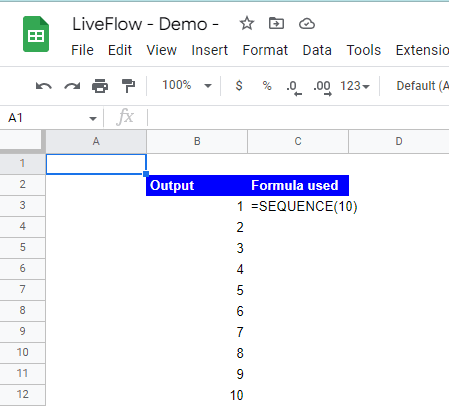
For example, if you wanted to generate a sequence of numbers from 1 to 10, you could use the following formula:

=SEQUENCE(10)
=SEQUENCE(10)
=SEQUENCE(10)
=SEQUENCE(10)

‍

This would generate a 1x10 array of numbers from 1 to 10, like this:
‍

How to use the SEQUENCE function 

‍

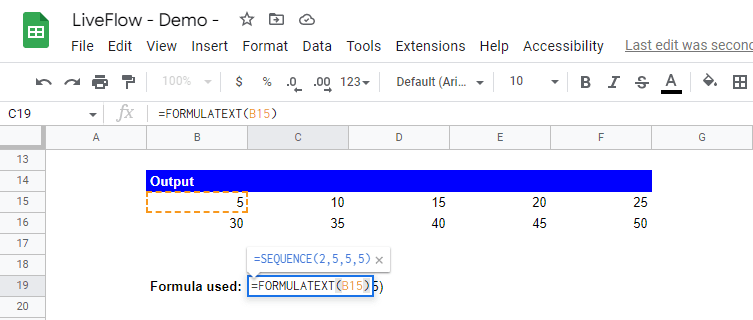
You can also use the other three parameters, columns, start, and step arguments to customize the sequence. For example, if you wanted to generate a 2x5 array of numbers starting from 5, with a step value of 5, you could use the following formula:

=SEQUENCE(2, 5, 5, 5)

‍

This would generate a 2x5 array of numbers from 5 to 50, with a step value of 5, like this:
‍

How to develop a 2x5-sized array

‍

   The world's top businesses trust LiveFlow to automate their financial reporting

   We turn Quickbooks Online data into a live FP&A dashboard in Sheets FAST!

   Book a Demo

Supercharge your financial reporting

LiveFlow is an agent of Plaid Financial Ltd. (Company Number: 11103959, Firm Reference Number: 804718), an authorized payment institution regulated by the Financial Conduct Authority under the Payment Services Regulations 2017. Plaid provides you with regulated account information services through LiveFlow as its agent.

© LiveFlow. All rights reserved.

Flow native Ramp integration.