Google Sheets Tips
collaboration
How to View Protected Ranges in Google Sheets
SHARE THIS Article
In this article, you will learn how to highlight protected ranges in Google Sheets.
This function is beneficial when an owner of a worksheet visually informs other editors which part of the sheet is not editable from their ends.
How to show protected ranges in Google Sheets
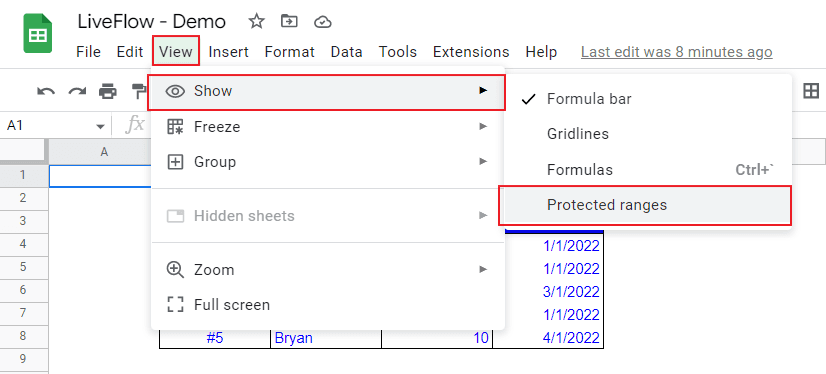
Go to “View” → “Show” → “Protected ranges”. Click “Protected ranges”.
Done
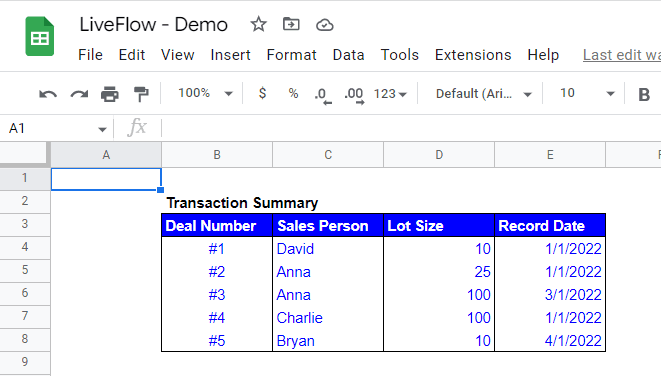
The following two pictures show the change before and after turning the function. The first screenshot is taken before we reveal the protected content.
In the sheet, the range of C4:E8 is protected by an owner, but other editors who are not allowed to edit the section don’t know which part is locked.
The second one below is taken after we check “Protected ranges” in the menu. You can see a diagonal stripe over the protected range in this case.
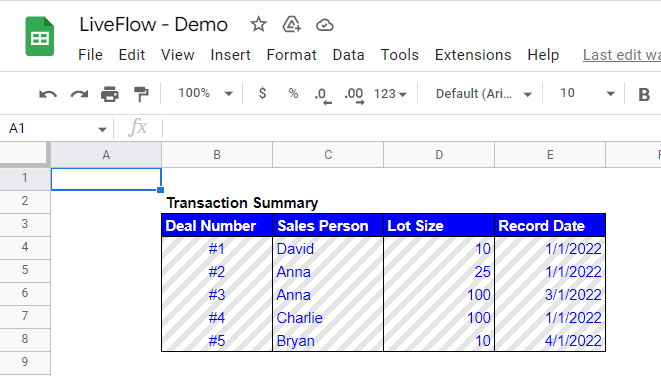
This function reduces the stress of editors by clearly showing where is editable or not and editors can focus their works on the editable area in Google Sheets.
Why spend hours creating spreadsheets, when we have already done the work for you?
100+ financial spreadsheet templates, all free and ready for you now.
Free Spreadsheet Templates
How do I turn off range protection in Google Sheets?
Do you want to know how to protect worksheets or a certain range of cells in a worksheet? Check this article: How to Lock Cells in Google Sheets
How do I unhide tabs in Google Sheets?
If you are interested in hiding or unhiding worksheets in Google Sheets, check this article: How to Hide a Tab in Google Sheets
When are locking cells and sheets beneficial?
Here is an example where cell protection is beneficial for an owner of a sheet. Imagine there is an accountant who prepares a financial report for a client in Google Sheets and shares it with the client to ask for their input. However, he doesn’t want his client to edit a particular part of the spreadsheet.
In this case, the accountant can achieve the ideal setting by locking specific cells or entire sheets except for certain cells.
The world's top businesses trust LiveFlow to automate their financial reporting
We turn Quickbooks Online data into a live FP&A dashboard in Sheets FAST!
Book a Demo
Supercharge your financial reporting