Google Sheets Formulas
others
How to Use MAX Function in Google Sheets
SHARE THIS Article
In this article, you will learn how to apply the MAX formula in Google Sheets.
How to utilize MAX formula in Google Sheets
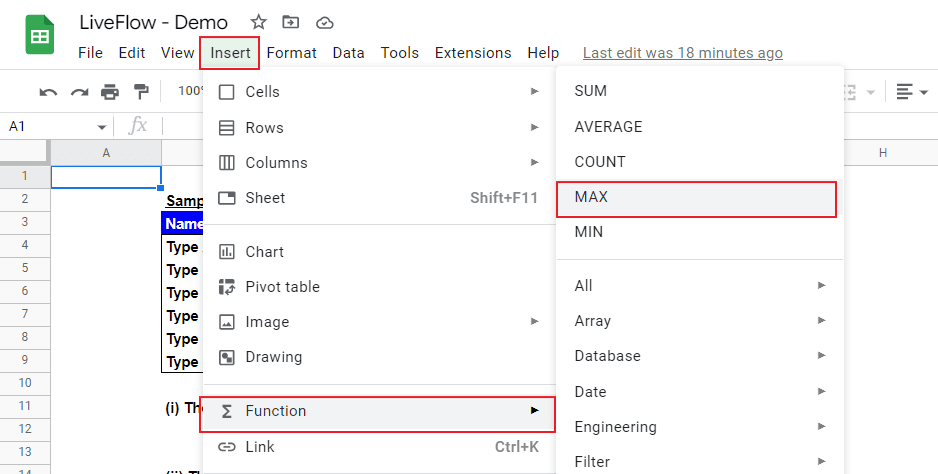
Type “=MAX” or go to “Insert” → ”Function” → "MAX“.
Select a range from which you want to find the highest number.
Your next financial spreadsheet could be right here!
100+ spreadsheet templates, from FP&A to tax planning.
Free Spreadsheet Templates
The generic formula is as follows:
Value 1: This could be a single number, a cell reference, or a range of cells
Let’s see some examples. Assume your company is preparing for a new product launch and you are working on quality tests for some product types (Type A to F) and want to find the highest score from a list of scores of the quality tests (Test A, B, and C). You can adjust the selection of a range based on the highest number you want to see.

(i) The highest Total Score
In the first example, the selected range is Total Scores of all types - 21, 24, 27, 30, 33, 36.
(ii) The highest single Test Score (in any Tests) for Type A
In the second case, the selected area contains Type A’s test results in each Test - 1, 7, 13.
(iii) The highest Test A Score
For the third example, Test A scores of all types are selected as a range in the formula - 1, 2, 3, 4, 5, 6.
(iv) The highest single score in Test A and C
You can select non-adjacent fields, as shown in the fourth example. In such a case, each field (as “Value”) should be punctuated by a comma.
(v) The highest single score in all Tests
You can also select an entire area if you want, but you must ensure that the chosen range doesn‘t contain irrelevant figures.
(vi) Example of a manual input
We recommend you always use cell reference(s), but if you want to know how to manually input a series of numbers in a formula to get the highest one among them, see the sixth example. You can input each number (as each “Value”) by punctuating them with commas.
Level up your Google Sheets skills with our FREE LiveFlow Academy
Basic and intermediate classes live now! Earn your certificate today.
Enroll in LiveFlow Academy
What does the MAX function do in Google Sheets?
It is simple. The function finds the highest number in a selected range.
How do you find the minimum value in Google Sheets?
You can use the MIN function in Google Sheets to find the lowest figure in a selected range.
Learn how LiveFlow can save you hours a month on financial reporting!
Just 30 minutes can change the way your business operates forever.
Book a Demo
Supercharge your financial reporting