Google Sheets Tips
none
How to Make Text Bold, Italic, and Strikethrough in Google Sheets
SHARE THIS Article
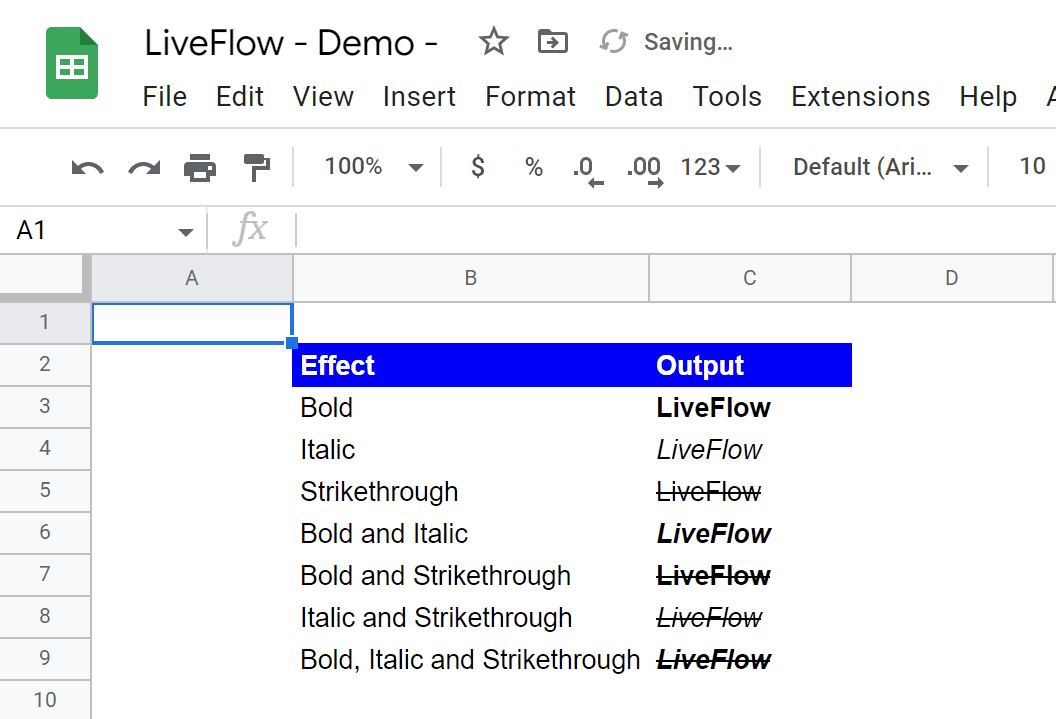
In this article, you will learn how to change your text formatting using three basic options, bold, italic, and strikethrough.
These help you highlight and differentiate key points in your sentences from others and make your sentences more readable and clear.
Why spend hours creating spreadsheets, when we have already done the work for you?
100+ financial spreadsheet templates, all free and ready for you now.
Free Spreadsheet Templates
How to apply bold, italic, and strikethrough formatting to your text and data in Google Sheets?
To make text bold, italic, or strikethrough in Google Sheets, follow these steps:
Open the Google Sheets spreadsheet that contains the text that you want to format.
Select the cells that contain the text that you want to format.
Click the "Format" menu in the top-right corner of the screen.
In the menu that appears, click the "Text" option.
In the sub-menu that appears, you will see options for making text bold, italic, or strikethrough. Click the option that you want to apply to the selected text.
Are there shortcuts to make text bold, italic, and strikethrough?
Yes, there are. You can also use keyboard shortcuts to make text bold, italic, or strikethrough in Google Sheets.
To bold text, use the keyboard shortcut Ctrl+B (or Command+B on a Mac).
To make text italic, use the keyboard shortcut Ctrl+I (or Command+I on a Mac).
To make text strikethrough, use the keyboard shortcut Alt+Shift+5 (or Option + Shift + 5 on a Mac).
Remember that these formatting options can only be applied to cells containing any value. When a cell has a formula, these formatting options are applied to a value returned by the formula, but not to the function itself.
Learn how LiveFlow can save you hours a month on financial reporting!
Just 30 minutes can change the way your business operates forever.
Book a Demo
Supercharge your financial reporting