Flow Agentic Accounting

LiveFlow FP&A

Industries

Resources

Flow Agentic Accounting

LiveFlow FP&A

Industries

Resources

Google Sheets Tips

date-and-time

How to Change Time Zone Setting in Google Sheets

SHARE THIS Article

‍

In this article, you will learn how to change your time zone setting in Google Sheets.

‍

This change may be necessary when you need to record your edit history or use time-related functions with time in a specific time zone, which is different from the time zone in which you usually work.

‍

‍

How to make a change in your time zone setting in Google Sheets

‍

  • Open a worksheet in Google Sheets.

‍

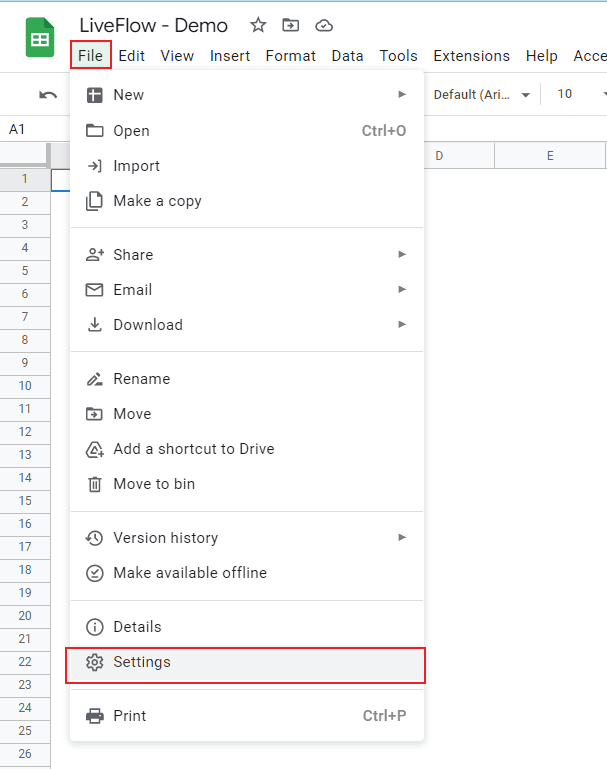
  • Navigate to the “File” tab and select “Setting”, which shows a pop-up window.

‍

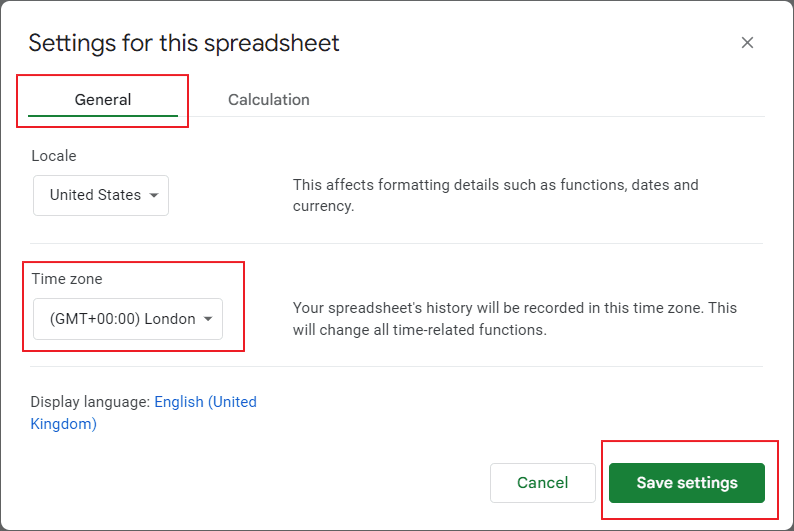
  • Ensure you are in the “General” tab.

‍

  • Choose a time zone you want to set in “Time zone”.

‍

  • Click “Save settings” at the bottom right in the pop-up window.

‍

   Save hours formatting your next financial spreadsheet!

   100+ templates, all free to use.

   Free Spreadsheet Templates

‍

Steps 1 and 2

‍

‍

Steps 3 and 5

‍

‍

   Turn Quickbooks Online data into a Google Sheets dashboard

    100+ templates, update automatically, totally secure!

   Book a Demo

Supercharge your financial reporting

LiveFlow is an agent of Plaid Financial Ltd. (Company Number: 11103959, Firm Reference Number: 804718), an authorized payment institution regulated by the Financial Conduct Authority under the Payment Services Regulations 2017. Plaid provides you with regulated account information services through LiveFlow as its agent.

© LiveFlow. All rights reserved.

LiveFlow is an agent of Plaid Financial Ltd. (Company Number: 11103959, Firm Reference Number: 804718), an authorized payment institution regulated by the Financial Conduct Authority under the Payment Services Regulations 2017. Plaid provides you with regulated account information services through LiveFlow as its agent.

© LiveFlow. All rights reserved.

LiveFlow is an agent of Plaid Financial Ltd. (Company Number: 11103959, Firm Reference Number: 804718), an authorized payment institution regulated by the Financial Conduct Authority under the Payment Services Regulations 2017. Plaid provides you with regulated account information services through LiveFlow as its agent.

© LiveFlow. All rights reserved.

LiveFlow is an agent of Plaid Financial Ltd. (Company Number: 11103959, Firm Reference Number: 804718), an authorized payment institution regulated by the Financial Conduct Authority under the Payment Services Regulations 2017. Plaid provides you with regulated account information services through LiveFlow as its agent.

© LiveFlow. All rights reserved.

Flow native Ramp integration.