Excel Formulas
others
REPT Function in Excel: Explained
SHARE THIS Article
In this article, you will learn how to use the REPT formula in Excel.
What is the REPT formula in Excel?
The REPT formula in Excel is used to repeat a text string a given number of times.
When should you use the REPT function in Excel?
You should use the REPT function in Excel when you need to repeat a text string a certain number of times. This can be useful in many different situations, such as:
Creating a series of characters or symbols: You can use the REPT function to create a series of characters or symbols, such as a line of dashes or bullets, to visualize numeric values.
Formatting cells: The REPT function can allow you to add a certain number of leading or trailing characters to a cell to help format it, such as adding a certain number of spaces before or after a cell's contents.
How do you use the REPT formula in Excel?
The general syntax of the REPT function in Excel is as follows:
<pre><code>=REPT(text,number_times)</code></pre>
text: A text string that is repeated the specified number of times defined in the “number_times” argument.
number_times: This parameter determines how many times the text string is repeated in a cell.
Note 1: If the “number_times” argument is zero, the function gives you “” (empty text)
Note 2: If the “number_times” parameter is not an integer, it is truncated
Note 3: If the outcome of the REPT formula is longer than 32,767 characters, the function returns a #VALUE! error value.
Look at the simple examples below. Text strings of “Hello”, “ABC”, and “X” are repeated two times, five times, and ten times, respectively, in Column D by the REPT formula.
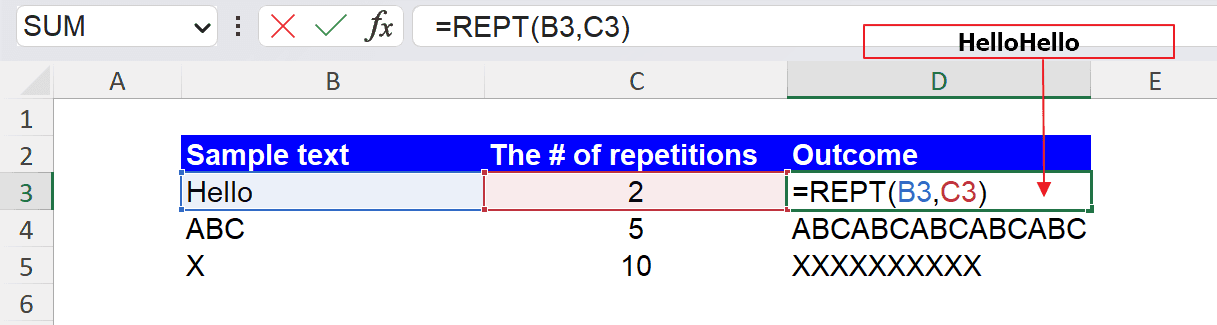
As another example, imagine that you have a client list containing clients’ names and their loyalty scores and that you want to visualize them with a character “・”, a bullet.
You can use the CHAR formula to insert a specific character. Using the CHAR and REPT formulas, you can create a column showing visualized data. In the picture below, the REPT function repeats the specific symbol the same number of times as the loyalty score for each item. (e.g., if a client loyalty score is 5, the REPT repeats the character five times, which generates five bullets in a cell).

Analyze your live financial data in a snap
Are you learning this function to visualize financial data, build a financial model, or conduct financial analysis? If so, LiveFlow may help you automate manual workflows and keep numbers updated in real-time. You can access more than fifty financial templates on our website, from the simple Income Statement to Multi-Currency Consolidated Financial Statement. You can also customize these templates as you want without breaking the automated data inflow.
To learn more about LiveFlow, book a demo.

You can learn about Google Sheets formulas and tips and other Excel functions and tips on this page: LiveFlow‘s How to Guides
Supercharge your financial reporting