Excel Formulas
search-and-extraction
LEFT Function in Excel: Explained
SHARE THIS Article
In this article, you will learn how to use the LEFT formula in Excel.
What is the LEFT formula in Excel?
The LEFT formula in Excel extracts a specified number of characters from the beginning of a text string.
When is the LEFT function useful in Excel?
The LEFT function in Excel is beneficial when you want to extract a specific portion of a text string. For example, you might use it to pull out the prefix of an ID number. It is also useful when extracting the first few characters of a text string to sort or filter the data. For example, you might use the LEFT function to extract the first letter of each word in a list of names to group them alphabetically. It can also be combined with other functions, such as the CONCATENATE function, to extract a specific portion of a text string and then combine it with another text string.
How to use the LEFT formula in Excel
The general syntax for the formula is as follows:
The "text" argument is the text string you want to extract characters from, and the "num_chars" argument is the number of characters you want to extract, starting from the left. The formula will return the entire text string if the "num_chars" argument is omitted.
Note: The “num_chars” parameter must be equal to or larger than zero. When “num_chars” is larger than the length of a text string, the LEFT function returns the entire text string. If the “num_chars” argument is left blank, the formula considers that it is 1.
Look at the following examples to understand the LEFT function better.
Example:
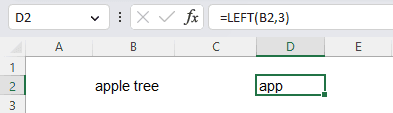
In this example, B2 contains "apple tree," and the formula would return "app".
You can also use the LEFT function in a more complex formula, such as combining it with other functions, like CONCATENATE, to extract a specific portion of a text string and then combine it with another text string.
An example formula is as follows::
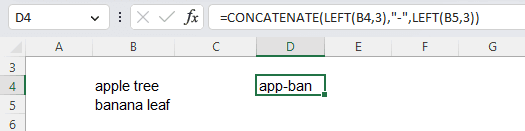
In this case, B4 contains "apple tree", and B5 contains "banana leaf". The formula would return "app-ban", as shown below in the picture.
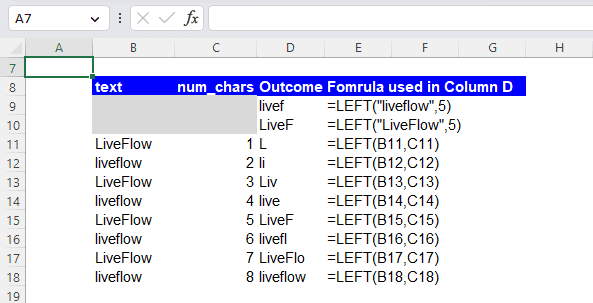
Finally, note that the LEFT function is case-sensitive, as shown in the screenshot below. So, “liveflow” and “LiveFlow” are considered different by the LEFT function.
Analyze your live financial data in a snap in Google Sheets
Are you learning this formula to visualize financial data, build a financial model, or conduct financial analysis? In that case, LiveFlow may help you automate manual workflows, update numbers in real-time, and save time. You can access various financial templates on our website, from the simple Income Statement to Multi-Currency Consolidated Financial Statement. Are you interested in this product but are an Excel user? That’s not a problem at all. You can connect Google Sheets to Excel quickly.
To learn more about LiveFlow, book a demo.

Supercharge your financial reporting