Flow Agentic Accounting

LiveFlow FP&A

Industries

Resources

Flow Agentic Accounting

LiveFlow FP&A

Industries

Resources

Excel Formulas

isxyz

ISOMITTED Function in Excel: Explained

SHARE THIS Article

In this article, you will learn what the ISOMITTED formula is and how to use the same in Excel.

‍

What does the ISOMITTED formula do in Excel?

The "ISOMITTED" formula in Excel is used to determine if a value is missing within a LAMBDA function, and it returns either TRUE (value is missing) or FALSE (value is not missing) based on the evaluation.

‍

How to use the ISOMITTED function in Excel?

The syntax of the ISOMITTED formula in Excel is as follows:

=ISOMITTED(argument)

Where, “argument” is the value you want to test, such as a LAMBDA argument.

‍

The ISOMITTED function returns a value of type Boolean (TRUE or FALSE).

‍

Sample Use Case for ISOMITTED formula

Create a LAMBDA function named “RectangleArea” that calculates the area of a rectangle when the dimensions of the two sides are provided as two inputs “x” & “y”. 


‍

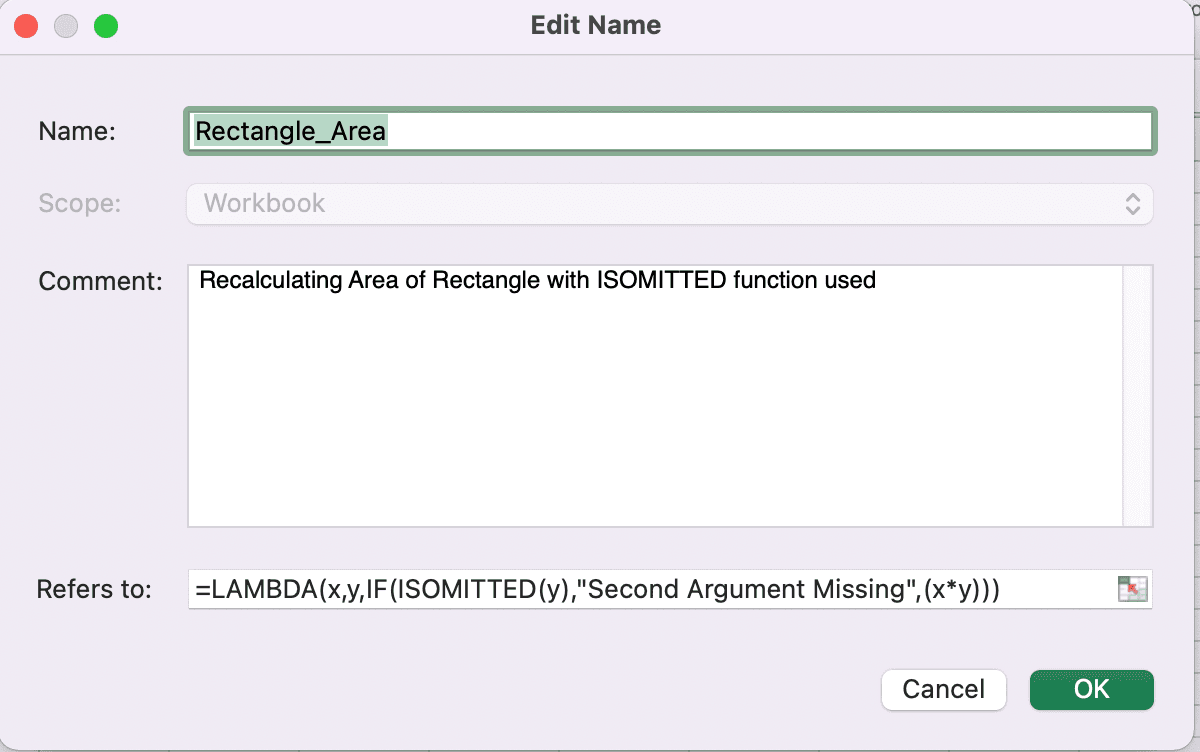
Similarly, create another LAMBDA function named “Rectangle_Area”, however, this time use the ISOMITTED formula to check whether y parameter is missing as shown below. 
‍

If the first RectangleArea function is used with only one input argument the LAMBDA function assumes the other as 0 and returns 0 as the output of the multiplication (seen in Row 4 below)

‍

However, if the LAMBDA function created in conjunction with the ISOMITTED is used, the appropriate error message is provided by the function Rectangle_Area when y parameter is missing. 

‍

If you want to create a similar LAMBDA formula which shows a proper error message when either x or y parameter is missing, you can generate the LAMBDA formula as follows:

=LAMBDA(x,y,IF(OR(ISOMITTED(x),ISOMITTED(y)),"Missing argument",x+y))

Supercharge your financial reporting

LiveFlow is an agent of Plaid Financial Ltd. (Company Number: 11103959, Firm Reference Number: 804718), an authorized payment institution regulated by the Financial Conduct Authority under the Payment Services Regulations 2017. Plaid provides you with regulated account information services through LiveFlow as its agent.

© LiveFlow. All rights reserved.

LiveFlow is an agent of Plaid Financial Ltd. (Company Number: 11103959, Firm Reference Number: 804718), an authorized payment institution regulated by the Financial Conduct Authority under the Payment Services Regulations 2017. Plaid provides you with regulated account information services through LiveFlow as its agent.

© LiveFlow. All rights reserved.

LiveFlow is an agent of Plaid Financial Ltd. (Company Number: 11103959, Firm Reference Number: 804718), an authorized payment institution regulated by the Financial Conduct Authority under the Payment Services Regulations 2017. Plaid provides you with regulated account information services through LiveFlow as its agent.

© LiveFlow. All rights reserved.

LiveFlow is an agent of Plaid Financial Ltd. (Company Number: 11103959, Firm Reference Number: 804718), an authorized payment institution regulated by the Financial Conduct Authority under the Payment Services Regulations 2017. Plaid provides you with regulated account information services through LiveFlow as its agent.

© LiveFlow. All rights reserved.